
Shopify
Overview of PostGrid's Shopify integration — install the app to add address autocomplete and verification to your store's checkout for billing and shipping.
Overview
Section titled “Overview”PostGrid Address Verification application for Shopify helps merchants ensure that customer addresses are valid, complete, and properly formatted for both billing and shipping. This helps reduce shipping errors, minimize returned packages, and improve overall checkout accuracy.
This integration enables Shopify merchants to seamlessly embed PostGrid’s Address Autocomplete and Verification directly into the checkout process of their online store.
Requirements
Section titled “Requirements”- PostGrid address verification API credentials.
- Shopify Plus store
- Admin access to the Shopify store
Install the Application
Section titled “Install the Application”Log in to your Shopify store with the admin account, and search for PostGrid Address Verification in the Shopify App Store.
Click Install and follow the authorization prompts. You’ll need to accept permissions to allow PostGrid to access checkout and order address data.
Connect your PostGrid app
Section titled “Connect your PostGrid app”Once the app is installed, you’ll need to connect your PostGrid account to enable address verification and suggestions.
Open the PostGrid Address Verification app from your Shopify Admin.
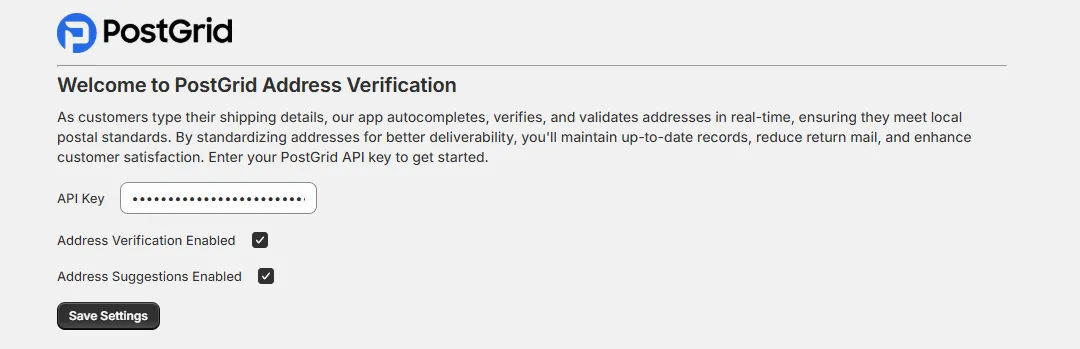
In the setup screen, enter your PostGrid API Key.
You can learn more about creating Server API Keys in PostGrid.
You can create either a Test or Live API key:
- Test API Key: Used for checking the connection to PostGrid. Address suggestions and verification results will return dummy data.
- Live API Key: Enables real address verification and autocomplete functionality using PostGrid’s production data.
Enable the desired features for your store:
- Address Verification: Validates and standardizes addresses in real time.
- Address Suggestions: Provides autocomplete suggestions to speed up data entry.
Click Save Settings to complete the connection.
Once saved, PostGrid is connected to your store, and automatically starts verifying and suggesting addresses in your Shopify checkout form.